Pitch
Voice shapingSets how high or low the voice sits.
A deep, heavy, slowed-down voice. Monster, giant, sinister narrator.
A high, light, sped-up voice. Chipmunk, cartoon, tiny creature.
Dead center leaves the pitch exactly as it was.
Change a voice, or hide one. Incognito reshapes any voice in your timeline, from cartoon characters to broken radios, with a dedicated Anonymize dial built to disguise a real person while keeping every word clear.
The short version
Drop Incognito onto a clip and you get one small set of dials that can do a lot. Turn someone into a robot, an alien, a monster, or a deep movie-trailer narrator. Push a voice through a phone, an old radio, or a megaphone. Or use the headline feature, Anonymize, to protect a guest's identity without bleeping them out or turning them into a cartoon.
Everything is built from the same handful of controls. There are no hidden menus and no per-character magic. Once you know what each dial does, you can build any voice yourself, or grab a ready-made preset and tweak it. This manual walks through every dial at its lowest and highest setting, then shows how they work together.
First run
From download to a clean export. Here is the whole path.
Incognito does all its work on your Mac and never listens in on your audio. The only thing that ever leaves your computer is the quick check that confirms your license key when you register.
The layout
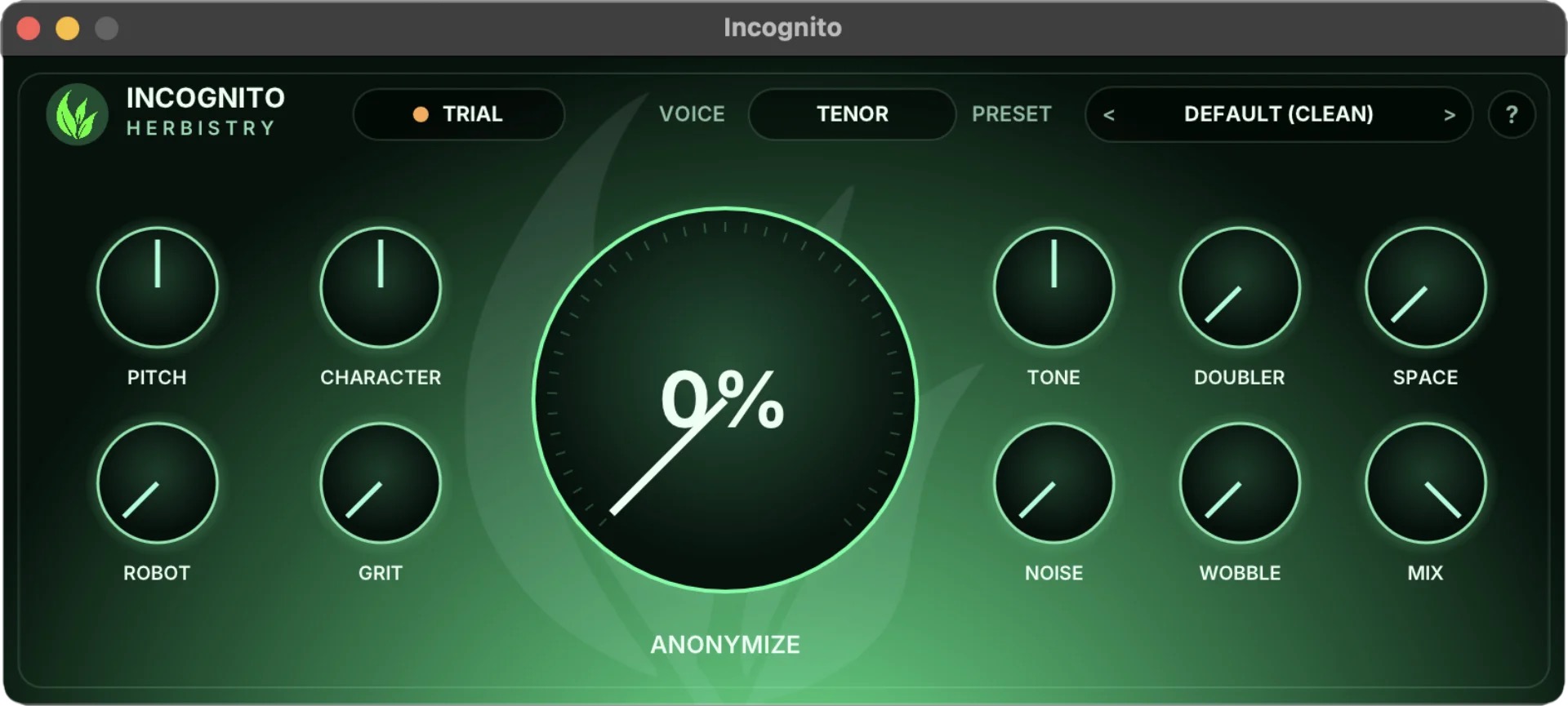
Incognito is laid out in three blocks: voice-shaping dials on the left, the big Anonymize dial in the middle, and the texture and output dials on the right. The numbered pins below match the full breakdown that follows.
Across the top
The dials
Every dial, low to high
Every dial does nothing at one end and its full effect at the other. Here is what you hear as you turn each one from all the way down to all the way up.
Sets how high or low the voice sits.
A deep, heavy, slowed-down voice. Monster, giant, sinister narrator.
A high, light, sped-up voice. Chipmunk, cartoon, tiny creature.
Dead center leaves the pitch exactly as it was.
Changes the size and resonance of the voice without changing the pitch. This is your gender and age lean.
A bigger, fuller, chestier voice. Reads older, larger, more masculine.
A smaller, brighter voice. Reads younger, smaller, more feminine.
Dead center leaves the voice's natural tone untouched.
The reason this plugin exists. It disguises who is speaking while keeping what they say perfectly clear, and it keeps shifting on its own so the disguise is hard to undo.
Off. Your real voice comes through with nothing added.
Strongest disguise. The speaker is masked but still easy to understand.
Anonymize stacks on top of everything else, so you can hide the voice first and then add as much or as little character as you want.
Adds a metallic, machine-like ring to the voice.
Off. The voice keeps its natural texture.
Full metal. Classic sci-fi robot or computer voice.
Adds dirt, drive, and distortion.
Clean. No distortion at all.
Heavily broken up. Demon growl, blown speaker, angry megaphone.
A single dial that runs from dark and muffled, through natural, up to thin and tinny.
Dark and muffled. Like the voice is behind a wall, or underwater.
Thin and boxy. The "through a phone, radio, or bullhorn" sound.
The middle is the neutral, do-nothing spot. This dial sits halfway by default.
Layers a second, subtly different copy of the voice on top.
A single, dry voice.
Thick and wide. Two takes stacked together for more body and presence.
Adds room, echo, and distance around the voice.
Close and dry, right up on the microphone.
Big and far away. A large hall, a cathedral, a ghost down a corridor.
Adds a hiss-and-crackle floor, the kind you hear from old gear.
Clean and quiet.
Noisy and staticky. Pairs with Tone for old radio, walkie-talkie, or phone-line.
Adds a slow, drifting unsteadiness to the pitch.
Rock steady.
Seasick, warped-tape wobble. Great for failing or degraded signals.
Blends the processed voice against the original, dry voice.
Only the original, untouched voice. The effect goes silent.
Only the fully processed voice. This is the default.
The space in between lets you soften any effect or keep a disguise sounding natural by letting a little of the real voice through.
Up top, next to the preset, is a Voice menu: Bass, Baritone, Tenor, Alto, Mezzo, Soprano. Pick the one closest to the speaker's natural range. It quietly tunes the presets so a voice built for a deep speaker still lands on a high one, and the other way around. If you are not sure, leave it on Tenor and adjust by ear. It does not touch the clean default or the device presets, since those are not about a voice range.
There is no wrong answer here, either. Picking the "wrong" range on purpose is a trick worth keeping: a deep-voice setting on a high speaker, or the reverse, often lands somewhere more interesting than the technically correct one. If it sounds good, it is good.
Advanced
Any single dial is simple. The fun starts when you combine them. Here is how the controls play off each other, and a few recipes to get you going. None of this is locked in: think of these as starting points, then trust your ears.
Work in three passes. Shape the voice first with Pitch, Character, and Anonymize. Add texture next with Robot, Grit, Tone, Noise, Wobble, Space, and Doubler. Then balance the whole thing with Mix. If a voice ever sounds like too much, you can almost always fix it by easing one setting back rather than starting over.
Pitch + Character, same direction
Move Pitch and Character the same way and the voice reads as a real, different human. Both down gives you a bigger, older person. Both up gives you someone smaller and younger. Keep the moves modest and it stays convincing.
Pitch + Character, opposite directions
Push Pitch one way and Character the other and the voice stops sounding like a person at all. This is the secret behind aliens, goblins, and creatures. Add a touch of Robot or Grit to seal it.
Anonymize up, Mix back a touch
Turn Anonymize up for protection, then ease Mix back just slightly so a little of the real delivery stays. You get a disguise that still sounds like a human being talking, not a machine. This is the go-to for interviews and witnesses.
Tone up + a little Noise + a little Grit
Roll Tone up to thin out the voice, sprinkle in Noise for the line hiss, and add a little Grit for the crunch. That is your phone, radio, or megaphone. Add Wobble on top and it becomes a signal that is barely holding together.
Space for size, Doubler for body
Space sets how far away and how haunted the voice feels. Doubler thickens it and gives it a produced, larger-than-life feel. A little of both reads cinematic. A lot of Space alone reads ghostly.
Preset first, then a light Anonymize
If you start from a character preset, it has already moved the pitch and resonance for you. So a light touch of Anonymize on top is usually plenty to break the identity. You rarely need to max both.

One click, full voice
A preset is just a snapshot of every dial at once. Pick one from the Preset selector up top, or step through them with the little arrows. Picking a preset sets all the dials for you, and you can still nudge anything afterward to make it yours.
The Feminine and Masculine presets give you a believable lean, not a flawless swap. They are labeled that way on purpose. They sound great as a creative voice, just do not expect them to fool anyone into thinking it is a different person's gender.
Make it yours
Built a voice you love? Save it and reuse it anywhere.
Each preset you save is a small file stored on your Mac under Music ▸ Herbistry ▸ Incognito ▸ Presets. Because they live there and not inside one project, your saved voices follow you everywhere: they show up in any audio app on your Mac that loads Incognito. You can also hand one of those files to a friend or teammate so they get the exact same voice.
Two kinds of "preset"
This trips people up, so it is worth being clear. There are two separate places a preset can live, and they save different things.
Use an Incognito preset when you want to reuse the voice anywhere. Use a Final Cut preset when you want Final Cut to remember the entire setup on a clip, automation and all, so you can stamp it onto the next one.
Cheat sheet
Every dial at a glance, from one end to the other.
| Dial | All the way down | All the way up |
|---|---|---|
| Pitch | Deep, heavy, monster | High, light, chipmunk |
| Character | Bigger, older, fuller | Smaller, younger, brighter |
| Anonymize | Off, your real voice | Strongest disguise, still clear |
| Robot | Off | Full metallic robot |
| Grit | Clean | Distorted, demon, blown speaker |
| Tone | Dark, muffled, underwater | Thin, tinny, through-a-device |
| Doubler | Single dry voice | Thick, wide, doubled |
| Space | Close and dry | Big hall, cathedral, ghostly |
| Noise | Clean and quiet | Hiss and crackle, old gear |
| Wobble | Rock steady | Warped-tape wobble |
| Mix | Original voice only | Fully processed voice |
Before you install
Incognito is a Mac audio effect. Here is what you need.
Get help
Trouble installing, activating, or running Incognito? Reach out and we'll sort it.
Open source
Incognito is built with the help of these open-source projects, each used under its own license. The complete license texts are included with the plugin and shown when you install it.